Translate this blog to many language

Friday, March 15, 2013

How to enable Speak Selection on iPhone and iPad


How to enable Speak Selection on iPhone 
and iPad


How to enable Speak Selection on iPhone and iPad
There are lots of accessibility options available in iOS that a lot of people overlook. One of those is Speak Selection which adds the ability for your iPhone or iPad to read back text to you. Opposed to voice over functionality which speaks everything you tap, Speak Selection can be activated but is only triggered when you choose to activate it.
Here's how to set it up and use it.

How to enable Speak Selection on iPhone and iPad

  1. Launch the Settings app from the Home screen of your iPhone or iPad.
  2. Now tap on General.
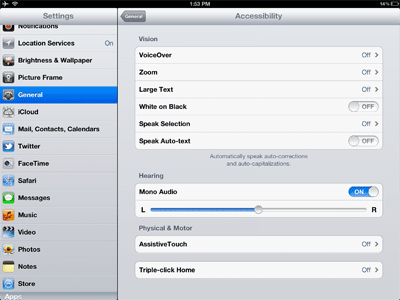
  3. Scroll down and towards the bottom, tap on Accessibility.
  4. Tap on the Speak Selection option and turn it to On.
  5. You can further customize the speed at which your iPhone or iPad reads the text and the dialect it uses. Once you're done, just tap the Home button to return to the Home screen.

How to use Speak Selection on iPhone and iPad

  1. Launch the app containing the text you'd like your iPhone or iPad to speak back to you.
  2. Hold your finger down on the text you'd like it to read to pull up the copy/paste menu.
  3. Highlight the text and in the text edit popup, select Speak.
  4. Your iPhone or iPad will now speak the text back to you.

Doctor Who iPhone app WhoNews donates all profits to Compaid for a week

Doctor Who iPhone app WhoNews donates all profits to Compaid for a week


Paul Gee has announced that from Saturday March 16th to 23rd all profits from the Doctor Who iPhone news app WhoNews with be donated to Compaid, the leading charity providing services to disabled people in the South East of England. WhoNews is a multi platform app which collates the latest news on Doctor Who from over 140 of the top Doctor Who websites, blogs, podcasts and artists every 15 minutes, 24 hours a day.
Paul Gee said, "Following last year's successful fund raising for charity, I've decided to run the event again and have chosen Compaid, the leading charity providing services to disabled people in the South East of England. For over 25 years Compaid have been supporting thousands of people to achieve their aspirations and get more out of life. Through computer skills training, accessible transport, and work experience opportunities, Compaid is providing disabled people with a springboard to realise their talents and abilities.
I am donating 100% of the profits from the sale of WhoNews for a week from the 16th to 23rd March, to coincide with the Big Blue Box 2, the popular one day convention (16th March) for fans of Doctor Who which rematerialises at Trinity Theatre, Tunbridge Wells, Kent to mark the 50th anniversary of everyone's favourite time traveller. All proceeds from the event will go to Compaid.
The event will include panel discussions with audience Q&As, a live debate, charity auction, special screenings, signings and stalls."
Stephen Elsden, Chief Executive of Compaid, said,"Compaid is delighted to be receiving this support from Paul Gee and his WhoNews app. The money raised from this campaign will help to train many disabled people in computer skills, not least how to access apps and tablet technology to improve their daily lives."
For more details on Compaid and for details of the Big Blue Box 2 convention visit http://www.compaid.org.uk/get-involved/big-blue-box-2/
Just by purchasing WhoNews on an iPhone, iPad or iPod, Android or BlackBerry during the week you will be supporting Compaid, so everybody can make a donation and keep in touch with the latest news on Doctor Who in return.
WhoNews keeps the fans up to speed with latest news on the Doctor's adventures in time and space. With WhoNews the user is guaranteed to know the latest news and gossip on the world's oldest science fiction TV series. WhoNews checks the top news sites including Kasterborous (http://www.kasterborous.com) and the hugely popular DT Forum for David Tennant fan news (http://www.dt-forum.com) every 15 minutes for new articles.
Features for version 2.10 on iPhone/iPad include:
* One universal app for iPhone, iPad and iPod touch buy once and use on all your devices
* Full iPad mode - WhoNews takes advantage of the full screen of the iPad for an enhanced browsing experience
* Most recent news view - time ordered news from over 120 websites including news, blogs, podcasts and special content
* Push notifications of the latest news
* Off-line browsing - read the latest news at your leisure
* Super fast search of all news articles by using a keyword or phrase
* News is downloaded in bulk from over 140 sites. A resilient server compiles the latest news every 15 minutes ready to be downloaded by WhoNews
* Bookmark your favourite news for rapid access
* Email and post articles or DVDs, Games, Books, CDs on Facebook, Twitter, Google Reader, Delicious, Tumbler, Pinboard, Read It Later
* Merchandise Search, the cheapest Doctor Who, Torchwood and Sarah Jane Adventures DVD/Blu ray prices in the UK & US from all your favourite internet stores
* Search for Doctor Who/Torchwood/SJA Games, Books and CDs using the built-in price comparison engine. Order by release date, search on actor
* Over 30 UK retailers compared including Amazon, Tesco, Zavvi, The Hut, SendIt, LoveFilm, Asda, Woolworths, HMV, Play, BBC Shop, DVD Source, MovieMail, Game, Waterstones, Book Depository, Game Station, Foyles plus many more
* US price comparison from Amazon US, Betam Online, Deep Discount, DVD Magnet, CD Universe, Music Import, DVD Empire and Yes Asia
* Use the in-built browser to visit a news site or buy a DVD, Games, CDs and Books direct
WhoNews 2.10 is only $1.99 (USD) or 1.49(GBP) and available worldwide exclusively through the App Store in the News categories. For more information visit their website, or follow on twitter @Who_News.

All about Accessibility: Accessibility features of iPad / iPhone and iPod

All about Accessibility: Accessibility features of iPad / iPhone and iPod


Accessibility is an important issue. One group of people that is especially affected by lack of accessibility is people with disabilities. It is important that people with disabilities (sensory or physical) can effectively use iPad or other iOS devices. iOS devices have important accessibility features to enable people with disabilities to use the device. In fact, iPad/iPhone/iPod are flexible enough to meet different user needs, preferences, and situations.
The accessibility settings for iOS devices can be found in the Settings app (Settings > General > Accessibility).
iPad, iPhone and iPod accessibility
These settings include these settings:
Vision:
VoiceOver: Read the contents of the screen so that a person with visual impairment disability can understand and navigate. VoiceOver can read in 36 languages. You can also connect Braille via Bluetooth.
VoiceOver
Zoom: will zoom / magnify the contents of the screen to enable people with vision impairment to see the screen.
Zoom
Large Text: makes the text bigger in some built-in applications such as Mail, Contacts, Calendar, Messages and Notes.
Large texts
White on Black: reverses the colors on the screen to create contrast.
whiteonblack
Speak Selection: Speak Selection will read you texts out loud in websites, email, messages that you highlighted.
Speak Selection
Speak Auto-text: This will type the spoken word and offer corrections on words that were not understood as clearly.
Speak Auto-text
Hearing:
Mono Audio: You can route both right and left audio into both earbuds at the same time. This feature can be helpful to people with unilateral hearing loss.
Physical and Motor
Assistive Touch: Assistive touch lets you use your device if you are having difficulties touching the screen by creating custom gestures.
Assistive Touch
Triple-click home: Triple-click Home is an easy way to turn some Accessibility features on or off by quickly press the Home button three times.
Triple-click home
Accessibility hardware for iPad, iPhone and iPod
 TecEar Music Link T-coil inductive ear loopTecEar Music Link T-coil inductive ear loop: This offers people who suffer from hearing loss to have loud, clear audio without feedback or distraction background noise.
Soft-Touch StylusSoft-Touch Stylus : This tool lets you type, tap and scroll effortlessly on a finger-touch screen without worrying about scratching display on iPhone, iPad, or iPod touch.
Accessibility apps for iPad, iPhone and iPod
You can easily find variety of products in the App store. Here are just a few of them:
soundAMP R ($4.99 – iTunes). This app amplifies the world around you discreetly with iPhone and iPod touch to help improve hearing ability.
Sign 4 Me – A Signed English Translator ($9.99 – iTunes): This app teaches American Sign Language (ASL) in 3D.
Eye Glasses ($2.99 – iTunes): This app offers 2X, 4X, 6X or 8X magnification levels using your iOS device.
Lack of Accessibility in Apps
Although, iOS includes a number of accessibility features designed to make iPad, iPod or iPhone easier to use for people with disabilities, some apps may not comply with certain design / development principles to make them accessible, thus they may not be compatible with features built into iOS such as VoiceOver.

iPad – Accessibility for All!


They can access mobile content, apps, and more using the iPhone, iPad, or iPod touch, which all feature screen magnification and gesture-based VoiceOver.
iPad – Accessibility for All!
At the end of January we traveled to London for BETT 2013, we got to see the latest assistive technology that is out there. I must say I was very surprised by the improvements that have been made in recent times.  I was particularly impressed with the accessibility features that are built into the Apple iPad.
The accessibility features on your Apple iPad are found in the general settings menu, under the accessibility key which is found when you scroll down the general options menu. There is a wide variety of accessibility features built into the iPad. These include;
  • VoiceOver, you use simple gestures to physically interact with items on the screen. Instead of memorising key commands, just touch the screen to hear an item’s description, then gesture with a double-tap, drag, or flick to control iPad. It allows you to enjoy the fun and simplicity of the iPad even if you can’t see the screen.
  • Zoom lets you magnify the entire screen of any application you’re using to help you see what’s on the display. How it works: Double-tap with three fingers to instantly zoom in and out 200 percent.
  • Invert Colors, If you prefer higher contrast, you can change the display on your iPad to white on black. This reverse-video effect works in all applications.
  • Speak Selection,  this lets you highlight text in any application by double-tapping it and the iPad will speak it back to you.
  • Audible Alerts, the iPad lets you activate audio alerts for incoming and outgoing mail and calendar event requests. iPad also offers an audio option for confirming keyboard actions.
The voiceover and large text functions are particularly useful for somebody with a visual impairment.  The speak selection and speak  autotext options are very useful for those with dyslexia. Interestingly enough the voiceover any screen reader is an Irish voice and  she is quite easy to listen to in comparison to your traditional screen reader.
It is now my view that Apple are at the forefront when it comes to making their products universally accessible to all. As well as a built-in accessibility features there are a large number of apps in the App Store which are specifically for people with special education needs.
At the moment the one which I’m getting most use of is Claro Read.  This is a very cheap but very effective screen reader. It is more effective than using the speech selection built-in option as it will scan large PDFs from your Dropbox in seconds and read the documents to you in full without stopping, it is also possible to download this application for your iPhone.  It has certainly made studying 10 times more efficient for me!
Ger

Here a video demo of the Voiceover function

How to Set Up Night Reading Mode for iPhone or iPad Screens

How to Set Up Night Reading Mode for iPhone or iPad Screens


Night reading mode works great on apps for reading books, like the Kindle eBook app. But not all book apps include the feature. A night reading mode turns the screen’s background dark, while providing white or light-colored text. Users will want to do this when reading in a dark room, so that the backlit screen doesn’t annoy others in bed at night.

 You could also use it while typing in a room where someone is presenting at work with the lights turned down. Using the iPhone Accessibility features, users can turn on a work-around night reading mode of sorts. This changes the entire OS user interface on the iPhone or iPad like the image below. We can set this feature to turn on using the Home button via the iPad’s Settings.

See some other great iOS tips including How to Set Up Multiple Reminders Lists on iPhone and How to Set Up iMessage on iPhone and iPad.

Steps to Turn On the iOS Version of Night Reading Mode 
Open the Settings App on the iPhone or iPad. Open General and scroll down to Accessibility and tap it to open.
accessibility in settings app
Open Accessibility in Settings app under General

Will they switch? The Kid Test: Windows Phone vs. iPhone


Will they switch? The Kid Test: Windows Phone vs. iPhone
Is Windows Phone's unusual user interface enough to win over two boys, ages 12 and 14, who are both iPhone users?


"Do you have that phone," one of my boys asked me earlier this year, after a Windows Phone ad came on TV. "Yeah, and could we try it?" said the other.
Thus was born the experiment we've run over the past month. Could Windows Phone entice one or both of my kids away from the iPhone?
My boys, 14-year-old Declan and 12-year-old Rhys, were fascinated by the ad showing the distinctive "tile" home screen of Windows Phone, with application tiles being moved around and resized. It looked different, cool, and unique from the iPhone 4 that they both use and from theAndroid phones they've seen me use.
Indeed, it is different -- credit to Microsoft for originality. But that interface, as well as the phone in general, hasn't been enough to make me regularly use my Windows Phone in the way I do my iPhone 5 or the Galaxy Nexus.
I have an HTC 8X Windows Phone that I was given when attending the Windows Phone 8 launch event last year. I use it occasionally to keep up on the platform. But the lack of Google Voice support -- something I've written before that Google should fix -- means I don't feel comfortable going out only with it, as I would with either of my other phones.
That's me and my pretty specific requirements. Would my kids be different? Microsoft agreed to lend them each a review phone, so I could find out. Declan ended up with an HTC 8X, just like me, while Rhys got the Nokia Lumia 920.

Declan and the HTC 8X
No Instagram!
For Declan, any chance Windows Phone had for winning him over was pretty much lost when he learned there was no Instagram app. Yes, we found apps that allowed him to browse Instagram pictures using his own account, settling on Metrogram. But neither that nor any of the apps let him upload images, and that was a big issue.
Apps that add filters to photos like Bubblegum or the built-in Photo Enhancer weren't a solution, either. He (and his friends) don't care much about using filters. It's about the sharing on that specific network. Instagram is their social network, a way for them to connect primarily through pictures.
Twitter, Facebook? Sure, he and his friends all use those. But Instagram is where it's really at, and without the ability to upload, he couldn't participate.
"I can only look at pictures. I can't post anything of my own. It's kind of annoying, if you like to be social," he told me.
"Instagram" app matches in Windows Phone app store
Nokia is pushing #2InstaWithLove campaign to pressure Instagram to make an official Windows Phone app. But Instagram should provide its own app for the same reason Google should provide a Google Voice app -- for security issues.
When there's no official app, third-party apps move in to fill the gap. That puts your users at risk, because it can be unclear if those apps are somehow logging password information. Your brand suffers, too, as people might not know what's real or not in the app search results they get back.
The Verge reported that Microsoft might be working on its own Instagram app. That, along with better policing of the app store, will help with some security issues. But even that app won't allow for uploads unless Instagram provides it with access.
Tiles not so coolHow about what attracted Declan to the phone in the first place, those cool tiles?
"The tiles were what drew me in, but then they didn't work as well as I thought," he said. "They looked cool, but when it comes to using them, it's kind of confusing."
Photo Enhancer app, in the upper left corner
Confusing? With the iPhone, each app icon also has a text label, so you know exactly what it is. But with Windows Phone, you only see labels if the apps are medium- or large-sized, not small. It's not something I thought much about myself, until he pointed it out.
"I have no idea what that's supposed to be. It's some lady," he said, pointing to the Photo Enhancer app. "You have to have them big to have labels."
There were also things he didn't like about the hardware, such as the placement of the volume buttons -- that's not really a Windows Phone issue and more a hardware issue. But it points to both an advantage and disadvantage of Windows Phone. Different models can lead to a different experience.
iPhone (left) vs Windows Phone calculator keyboard
Hurray for the calculator
On the upside, Declan did like how his People tile, when large, rotated to show pictures of his different contacts. He also liked that the screen was nice, clear, and big compared with the iPhone 4. Another favorite was the calculator, for having a backspace key, unlike the iPhone.
It was one of those things I would never think much to consider, since I rarely use my phone's calculator. But as a student, he's using it all the time. Having to clear an entire entry rather than deleting one mistakenly-entered digit is a pain.
Of course, there are no doubt replacement apps that can be found for the iPhone to solve this particular issue.
In love with the big screen

The screen on the Nokia Lumia 920 is even bigger than that of the HTC 8X, and it's one of the things that won over Rhys. He began watching TV shows on Netflix through his phone, something he never did on the iPhone, because the larger screen makes viewing easier.
Like his brother, Rhys wasn't happy to find that some games like Plants vs. Zombies were more expensive for Windows Phone ($5) than for the iPhone ($1). One blamed Microsoft for this; the other blamed the game makers. I don't know who to blame, myself.
Tiles make it 'flowy' and Xbox link is niceAs for those tiles, Rhys does like how they make his phone feel more "flowy" compared with the iPhone. He also quickly resized and moved the tiles around, stuff he learned from the ads alone. He liked how the Facebook tile did live updates of status messages.
He also liked how the Games app linked to his Xbox account. He used that connection to change his avatar look, to send messages to other Xbox friends, and more. "It's nice to see what your friends are playing, or what achievements you've done," he told me.
Leaving the iPhone behind
I knew Windows Phone had captured Rhys entirely when, walking out of the house to go on a short vacation, I noticed he'd left his iPhone behind on his desk. He was all in on Windows Phone, no safety net and not worried at all. In fact, his biggest concern has been having to go back to the iPhone 4.
"Overall, it just felt more unique. It felt as if I had control of the phone and was able to do more things with it," he said when asked to sum up his experience with Windows Phone.
But will the parents switch?
In the end, perhaps the biggest challenge to him and other kids going to Windows Phone is that he and his brother are getting our cast-offs. When we upgrade, they get our previous-generation devices.
For Rhys to go Windows Phone, he really needs me to go Windows Phone. I certainly have no inclination to put him on a contract -- which he's not on now -- just to knock the $400 full price for a Lumia 920 with AT&T down to $100.
This is where newly announced Nokia phones like the Lumia 520 might come in. The phone is first headed to China but is promised to eventually come to T-Mobile in the U.S. At around $180, it becomes more reasonable to consider as a purchase for a birthday or holiday gift, or for kids to save up for it their own.
Then there's the Nexus 4. Both my 21-year-old niece and the daughter of a friend who is about the same age couldn't wait to get one. For me, the lack of LTE makes it a non-starter. But for someone who's young, who doesn't want a contract, the flat price of $300 might be the most compelling smartphone feature of all.
Related to that, I might try this test again with Android phones. But what kicked it off in the first place was the unusual UI of Windows Phone that attracted the interest of my boys.
Ultimately, I found it amazing that for one son, there really was a killer app that killed Windows Phone in its tracks: Instagram. By contrast, the other was hooked by things he can't get from an iPhone -- a large screen coupled with an unusual and fun UI.
A note about commenting
On a personal note, phone reviews are often a magnet for abusive fanboy comments. Both my children weren't trying to be experts in their use of Windows Phone, nor trying to cheerlead for or attack any particular brand. It was just an experiment to see if they found Windows Phone compelling enough to leave the iPhone behind.
Whether you're an iPhone lover, a Windows Phone lover, or an Android lover, you are welcome to comment and point out issues. But please do so in a constructive manner. My boys will naturally want to read the responses themselves, and I'd hate for them to see adults acting immaturely.


Twitter acquires We Are Hunted, readies standalone music app


Twitter acquires We Are Hunted, readies standalone music app
Don t forget that Sound Cloud has Union Square as one of their investors (eg yet another twitter investor)

SCOOP: Twitter is preparing a music discovery app built on technology from a recent acquisition. It could be released by the end of the month.

We Are Hunted's streaming music service is coming to a new Twitter app.
Twitter acquired the music discovery service We Are Hunted last year and is using its technology to build a standalone music app, CNET has learned.
The app, to be called Twitter Music, could be released on iOS by the end of this month, according to a person familiar with the matter. Twitter Music suggests artists and songs to listen to based on a variety of signals, and is personalized based on which accounts a user follows on Twitter. Songs are streamed to the app via SoundCloud.
Twitter Music, which is set to arrive in the wake of key competitor Facebook overhauling the music section of its News Feed, shows Twitter taking new steps into becoming a full-fledged media company. The app acknowledges the key role music has played in drawing new users to the service -- particularly younger, mainstream users. Pop stars have some of Twitter's most popular accounts, with followings in the tens of millions. The TwitterMusic account has 2.3 million followers -- not a bad perch from which to launch an eponymous app.


Twitter and We Are Hunted did not respond to multiple requests for comment.
An app built for discovery
Unlike Vine, the video sharing app that Twitter released in January, the music app carries Twitter branding. The app's icon consists of a silver "play" button with the familiar blue Twitter bird looking down on it from the corner.
Once it launches for the first time, the app offers a short guided tour. Users with Twitter accounts are invited to sign in so that they can received personalized music recommendations. It's also possible to use the app without having a Twitter account, which could help attract new users to the service.
Twitter Music uses four main tabs. 'Suggested' recommends songs and artists based on a user's follower graph -- artists they are following, and artists that other people they follow are following. #NowPlaying brings in links to songs tweeted by people you follow who tweet using that hashtag. For the past month or so, We Are Hunted employees have been using the #NowPlaying hash tag frequently on Twitter in an apparent test of the forthcoming app. Here's We Are Hunted co-founder Stephen Phillips with a test tweet:
The app has two more tabs: 'Popular' brings in songs trending on We are Hunted, and an 'Emerging' tab tracks up-and-coming artists.
Artists and songs are displayed in an elegant grid design. Tapping on the tile for an artist causes the tile to expand, showing a short biography along with links to any music the artist has stored on SoundCloud, or to song previews from the iTunes store. Users then tap a 'play' button to start streaming the music. So far, the app does not integrate with Spotify or other streaming services.
One aspect of the app artists are sure to like -- users can follow them on Twitter directly from Twitter Music.
The Hunted join the flock
Twitter Music will be powered by technology built by We Are Hunted, which was acquired some time in the last six months, according to our source. Terms of the deal were not available.
We Are Hunted, whose free music discovery service remains available, was created by a group of Australian software developers in 2009. Stephen Phillips, who founded a news aggregation service called Wotnews, built the site along with Richard Slatter and Michael Doherty. A fourth founder, Nick Crocker, has since left the company.
Angel investor Graeme Wood, founder of Australian travel site Wotif, put $3 million into the company in the company's only disclosed investment. On April 17, 2009, they opened We Are Hunted to the public.
The service creates a kind of Billboard chart for online music, monitoring popular songs on blogs, social media, message boards and BitTorrent. Users can stream music, create playlists and share their favorites on social media.
The team has also released a series of music discovery apps for smartphones and tablets, including Music Hunter for iPad and Super Sonic for iPhone. We are Hunted formed a number of partnerships to create other standalone apps, including Pocket Hipster, a novelty app created with the Echonest that poked fun at hipsters while also promoting new music. It was a launch partner with Spotify, where it built an app to let users listen to We Are Hunted charts from inside the Spotify client. As of last June, We Are Hunted said it was getting about 1 million unique visitors a month.

Today We Are Hunted is based in San Francisco. The team is said to be fewer than 10 people. Meanwhile, the founders' bios have been removed from the We Are Hunted site. The We Are Hunted Twitter account hasn't tweeted for two weeks.
What it means
The question for Twitter will be whether a groundswell of users find the app useful enough to displace the existing options for music discovery, which are numerous and popular. Pandora has more than 67 million active users; Spotify has more than 24 million. Facebook made music a key focus of its recent news feed redesign, and Google is striking deals to build a subscription music service of its own. Twitter Music looks fun to browse, but it may find it hard to compete against more full-featured music apps, which among other things allow for offline storage of songs.
Still, Twitter Music represents an intriguing effort to take the many successful artists broadcasting on the platform daily and use them to form new relationships with their fans. In time, it's easy to imagine Twitter integrating ticket purchases or other e-commerce into the app. For now, though, music fans can only watch and wait as Twitter puts the finishing touches on one of its most interesting experiments to date.

Search